Backtalk Mobile
Backtalk Mobile adds a private browser-based voice and text interface to Jared Rhodenizer’s local AI stack, letting you reach your agent from a phone through Tailscale while speech, memory, and Codex stay on your computer.
Before getting into the mobile companion, it helps to understand the stack it sits on. I have been using Jared Rhodenizer's full-stack deployment, which brings an AI agent's memory, voice, and visual interface together on one local computer. The memory is a folder of Markdown files you own, Backtalk is the voice layer, the visualizer is the agent's on-screen face, and barehands is an optional hand-tracking layer. Jared's installer assembles those pieces through Claude Code so they work as one system.
If you already use Jared Rhodenizer's Backtalk, you have a local voice interface for your AI agent on your computer. Backtalk Mobile adds a browser-based companion so you can reach that same setup from a phone or tablet without moving the agent, memory, or speech stack into a hosted service.
The project is available here:
This is an independent companion project. Backtalk is Jared's project, and his setup instructions are at jaredrhod.com. Start there if you are building the underlying Backtalk, Claude Code, and memory-vault setup for the first time.
One important distinction: Jared's documented and recommended path for Backtalk is Claude Code, and Backtalk's voice layer is built around Claude's agent SDK. My full-stack deployment started from that foundation, but my mobile variation uses Codex for the agent conversation behind Backtalk Mobile, launched in read-only mode. This article documents that Codex variation, while Jared's site remains the starting point for the underlying stack. If you have questions about getting Backtalk Mobile working with Codex, join the Tech47 Discord and ask there.
What Backtalk Mobile does
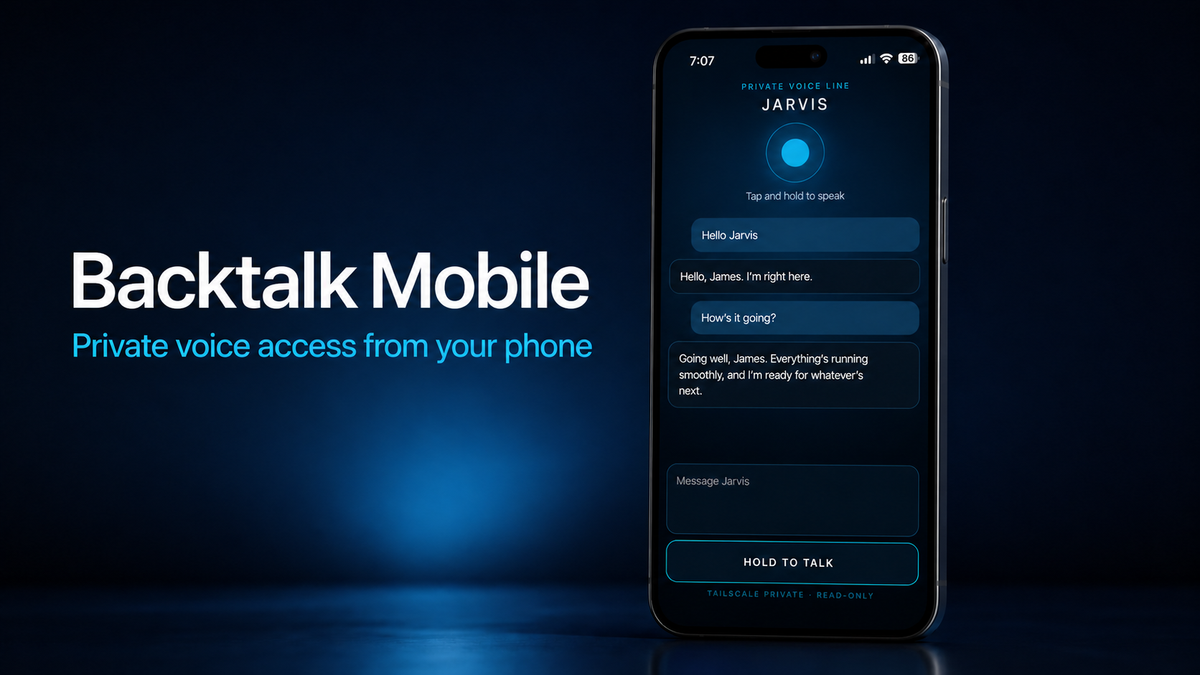
Backtalk Mobile is a small web application that runs beside Backtalk on your own computer. Open it in a mobile browser and you get:
- A text chat box for typed messages.
- A push-to-talk control for voice messages: tap once to start, tap again to send.
- A stop control that cancels a response and queued audio so you can ask a new question.
- The assistant's reply displayed on screen in both cases.
- Streamed audio replies for voice input.
- Optional audio replies for typed input, controlled by one configuration setting.

By default, typed messages stay visual-only. That avoids having the phone speak when you are quietly sending a text. If you want every reply spoken, set speak_typed_replies = true in the local configuration file. Push-to-talk replies always return as text and audio. If you prefer the original press-and-hold interaction, set talk_mode = hold.
The mobile page is only the interface. In my setup, Backtalk continues to provide the local speech components while Codex CLI handles the agent conversation in read-only mode. The companion does not replace either project or introduce a separate hosted memory service.
How the connection works
The normal path is:
phone browser -> private HTTPS connection -> Backtalk Mobile -> Backtalk speech components and Codex CLI on your computer
The default listener is bound to loopback, so it is not exposed directly to the local network. For phone access, the recommended approach is Tailscale Serve, which keeps the service inside your tailnet. Do not use Tailscale Funnel unless you intentionally want to publish the service to the public internet and have designed an authentication layer for that exposure.
This is a companion for a trusted personal setup, not a multi-user hosted chat service. Treat the device and tailnet that can reach it as trusted access points.
Setup
- Set up Backtalk by following Jared's instructions at jaredrhod.com, including Claude Code and the local memory system. Claude Code is Jared's recommended and supported path for Backtalk.
- Clone Backtalk Mobile next to the Backtalk checkout.
- Copy
backtalk-mobile.conf.exampletobacktalk-mobile.conf. - Set
backtalk_dirto the path of your Backtalk checkout. The default assumes both repositories are sibling folders. - If you are using the Codex variation documented here, install and authenticate Codex CLI for the user who will run the service.
- If your Backtalk virtual environment is somewhere else, set
BACKTALK_MOBILE_PYTHONto that Python executable before startingrun.sh. - Start the companion with
./run.sh. - For access from a phone, put the local port behind Tailscale Serve, then open the generated HTTPS address in the mobile browser.
The local configuration looks like this:
[mobile]
backtalk_dir = ../backtalk
assistant_name = Assistant
host = 127.0.0.1
port = 8765
talk_mode = push
speak_typed_replies = false
Change assistant_name to whatever name you want shown in the interface. Keep the real configuration file private. It is ignored by Git, along with session state, logs, caches, and Python bytecode.
A couple of practical details
The first time you use the page, allow audio playback when the browser asks. Mobile browsers generally require a user gesture before they will play streamed audio. The Send button prepares playback for an optional typed-message reply, while the push-to-talk control requests microphone access only when you start a voice recording. During a reply, tap STOP RESPONSE to stop queued audio and cancel the active turn before asking something new.
If the page loads but cannot connect, check that Backtalk is running, the configured Backtalk path is correct, and the local health endpoint responds before troubleshooting Tailscale. If voice input fails, check the browser microphone permission for the site.
Credits and license
Backtalk Mobile is an independent companion for Jared Rhodenizer's Backtalk. It does not claim ownership of Backtalk or the surrounding Jarvis setup. The companion is released under the GNU Affero General Public License version 3 or later, consistent with the upstream project relationship. See the repository's LICENSE file for the complete terms.
If you improve the mobile companion, please keep the attribution and license notices with the project and send useful fixes upstream where appropriate.
Links
- Backtalk Mobile source code
- Jared's setup guide and project hub
- Backtalk on GitHub
- Tech47 Discord for questions about the Codex variation
Related articles
Backtalk Mobile
Backtalk Mobile adds a private browser-based voice and text interface to Jared Rhodenizer’s local AI stack, letting you reach your agent from a phone through Tailscale while speech, memory, and Codex stay on your computer.
5 Practical Ways AI Can Make Home Assistant Easier
Home Assistant can automate almost anything in your house. The hard part is not turning on a light. It is translating an idea like "make the hallway

NFC Tags: Best Storage Solution by far!
Home automation today consists of so many smart options and it has made things a lot easier. But what about things that aren't smart? Take storage